The Flight1 Agent
Overview
 Always
get the latest version! Please update by re-downloading or go to Settings and Check for Updates.
Always
get the latest version! Please update by re-downloading or go to Settings and Check for Updates.
The Agent uses the .NET 4 platform. If you are not using Windows 10 or 11 and .NET 4 is not installed, you can get it here.
The Flight1.com Agent is Flight1's next-generation E-Commerce platform. It is a very compact plaform that is only 3 files and less than 2MB in total size. It is only run when called and does not run as a background service. This dynamic application is built with some of the best features of the classic Flight1 Wrapper in mind, with many new features to enjoy including multiple stores within the agent, easy management of all your orders via a single application, view videos in our Live Capture option, and more.
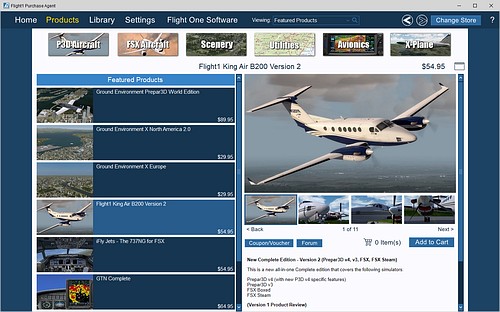
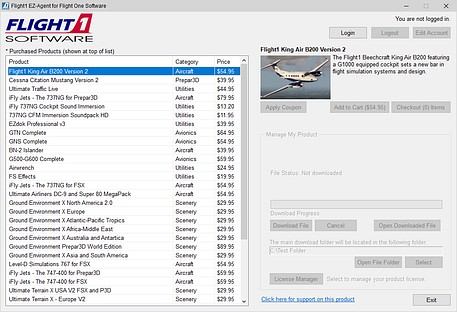
Advantages of the Flight1 Agent:
You can manage your Flight1 purchases within a single application including viewing all your past Flight1 orders (many will be auto-converted to be in this system).
The application contains different "Stores" within the Flight1 Agent "Mall" which allow for customized presentations of different product lines by different vendors.
Product downloads are handled within the system with all files stored to a configurable download location.
Product updates can be distributed via the Agent.
You can purchase more than one item from multiple stores at the same time.
There is an Auto-Lookup option for product discounts if you are upgrading from an earlier version. No need to enter a coupon code in this case!
Our Live Capture feed is a unique way to view captured video associated with a product.
Forums and a ticket system are built into the system (configured at the vendor/product level).
Communication to customers from publishers/developers is included so that you can get news, notifications, and product update information about your products.
If you are a developer or publisher and want to utilize the Agent to sell your product, please contact us via our ticket system.
How
to get the Flight1 Agent:
The Flight1 Agent is a free download. Run the installer to install the application. We have tried to keep the size of the download to a minimum (the setup is < 2mb in size). A Flight1 Account will be required to purchase with the tool, however an account is not required in order to run the tool and check out the different stores.
The Agent uses the .NET 4.6 platform. If you are not using Windows 10 and .NET 4.6 is not installed, you can get it here.
General Questions:
How to reinstall a Flight1 product that you purchased via the Flight1 Wrapper that is only available in the Agent
If you login to the Agent using the same email account that you used with the original wrapper purchase, your products will automatically show up in the Agent Library. If you do not have a Flight1 account, please create an account here and use the email address you originally used for your non-account purchases. Your orders will get automatically assigned to your account and then show in the Agent Library. Do contact Support if you need more assistance.
What about the Flight1 Wrapper?
Flight1 is moving to more modern platforms. Products in the wrapper can no longer be purchased through the wrapper, although some may be available in the Agent (do a product search on this site). The classic wrapper can still be used for product reinstallation in most cases..
How do I report issues with the Flight1 Agent?
You can use the main forum from the home page of the Flight One Software store. You can also contact us via our regular Customer Service channels.